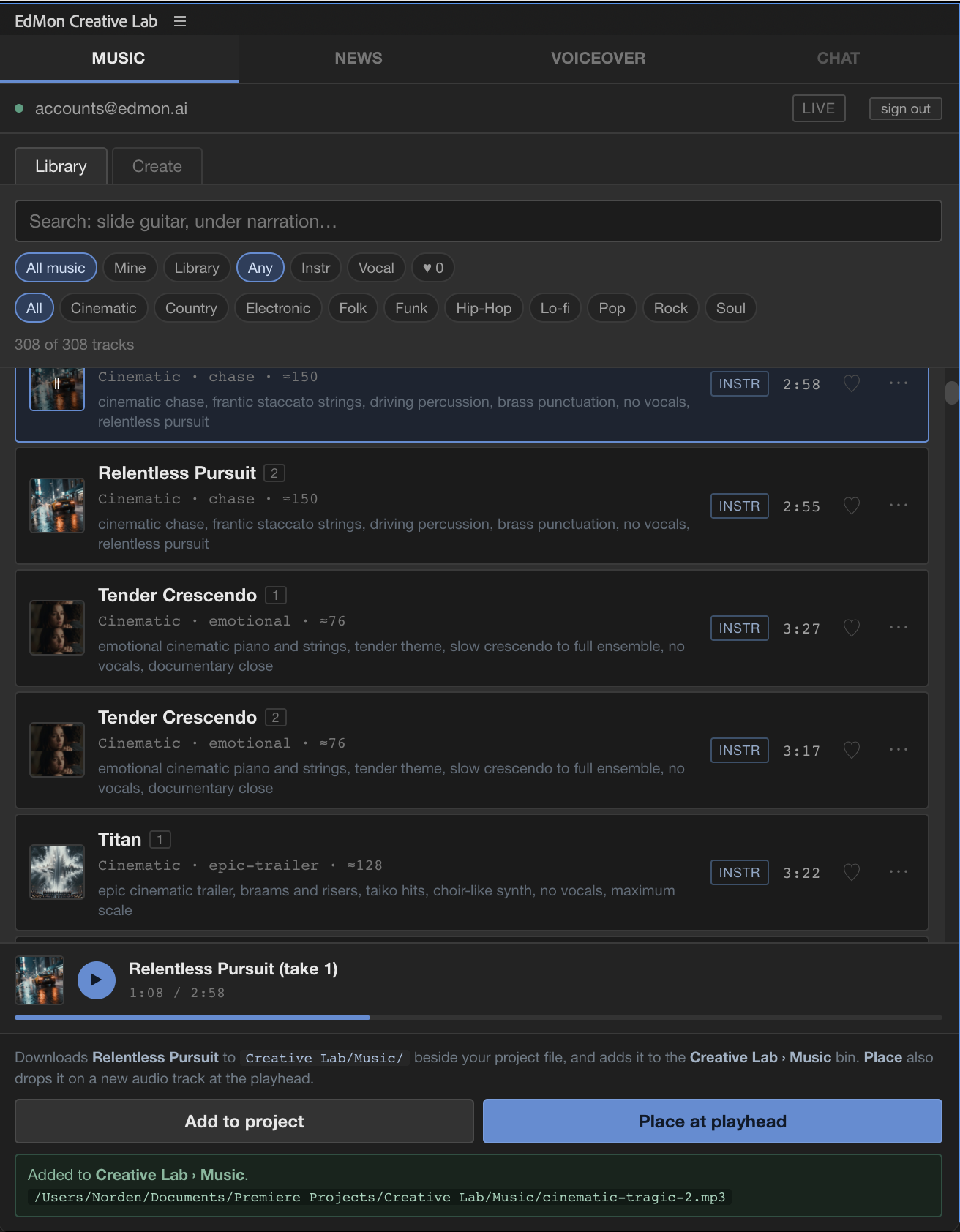
A music library and a generator, in a panel beside your timeline. The
search understands what a track sounds like, not just what it is called. When nothing
in the library fits, describe the scene and get two takes back.
Stock libraries index whatever someone typed into a metadata field. This one reads how
a track actually plays, so the words an editor would say out loud are the words that
find it. Try them — none of these are titles.
slide guitar
Audition
Hear it against the picture before it touches the timeline.
You cannot tell whether a track works from a waveform, and you should not have to
drop it into the sequence to find out. Press play in the panel and the cut rolls with
it — from the top, or from your in-point — so you are watching the scene and hearing
the candidate at the same time. Nothing is added, nothing to undo.
Auditioning against a sequence. The panel plays the cut alongside the track,
so the only thing being judged is whether the two fit. Loops, with sound — turn it
up.
From the top, or from the in-point
Judge an opening from the first frame, or park on the scene that actually needs the
music and start there.
Reject without cleaning up
A track you did not choose leaves no trace — no clip on a track, no file in the bin,
nothing to tidy before you try the next one.
When nothing fits
Describe the scene. Get music for it.
Write the brief the way you would tell a composer what a scene needs, then set genre,
mood, tempo and whether you want vocals. Every generation comes back as two takes,
because the second one is often the one you use.
Twenty-six seconds, unedited: a brief written in the panel, takes arriving
while the edit stays open, and a track dropped onto an audio track under the cut.
Two takes, every time
Ask for up to five versions of one brief in a single batch. The queue keeps working
while you switch tabs and carry on cutting.
Trimmed like any other music
Tracks arrive at full length, three to four minutes, and you cut them to the scene on
the timeline.
Into the edit
One click from the panel to the sequence.
Send a track to the project and it lands in your bin. Or place it at the playhead and it
arrives on a new audio track, where you are parked. Files are written beside your project
file, named exactly what the bin shows — so the next person to open the project finds the
music where they would look for it.
Get started
Download it, install it, and score the next scene.
No form to fill in first. The panel installs into Premiere and you make your
account inside it — thirty days, no card.
$20 per month, cancel any time
Prices exclude tax. Where VAT applies it is added and the total is shown in full before you pay. Businesses with a valid VAT number pay no VAT.
The whole library. Every track, across ten genres, with no
per-download charge.
Fifty briefs a month, a hundred tracks. Every generation returns
two takes, and both are yours.
Around 2,500 new tracks a month. Everything added lands in your
account as it arrives.
No key to manage. Generation runs on our own service — nothing to
obtain, paste or pay for separately.
Three steps
How it will work, once the download is open.
Download the panel. 0.11 MB, and the download page walks
through installing it. Quit Premiere first.
Open it in Premiere. Window › Extensions › EdMon Creative Lab.
Make your account in the panel. Email and a password. Thirty days
with the whole library and ten credits. No card.
Premiere Pro 22.0 or later, on macOS. Windows is not available yet.
Anything you favourite while you are trying it stays with you when you make the
account — nothing to redo.
What it needs
A panel, not another account to manage.
Host
Adobe Premiere Pro, version 22.0 and later
Platform
macOS. Windows is not available yet.
Install
A 0.13 MB panel file, installed with a free extension installer. Quit Premiere first; the download page has the steps.
Sign in
The account you create in the panel
Where files go
Beside your project file, under Creative Lab / Music
Subscriptions renew automatically until cancelled, and you can cancel at any time from
inside the panel. Prices are shown excluding VAT, which is added where applicable.
Payment is handled by Stripe; we never see your card details.
Edmon Producer AB · org.nr 559455-1227 · Bragevägen 19, 114 24 Stockholm, Sweden ·
VAT SE559455122701