EdMon Premiere MCP

Tell Claude what the edit needs. Watch it happen in Premiere.

EdMon connects Claude to Premiere Pro. Ask in plain words for the bins, the selects, the assembly, the music or the lower third, and it is done in your project, on your timeline, on your own Mac. You keep the cut. Claude does the clicking.

Start your 7 days free 7 days free. Then $30 a month. Mac with Apple silicon, 130 MB.
Works inside Premiere Pro
Claude can see your footage
1,300 music tracks included
10 hours of transcription a month
Graphics rendered with alpha
55 seconds, real screen recordings: one folder of clips, one sentence to Claude, three finished stories in Premiere.

The point of it

Most of an edit day is not editing.

Importing the card. Making the bins. Logging the clips. Finding the take where she gets it right. Laying the selects down in order. Hunting for a track that fits. Building the lower third for the fifteenth time. None of it is the cut, and all of it comes before the cut.

The EdMon Premiere MCP gives that work to Claude. You describe it once, the way you would to an assistant editor, and it is done in the project you already have open.

How it works

Three steps, and you are working in Premiere as usual.

Step one

Install EdMon

One app on your Mac. It connects Premiere Pro to Claude and checks both are ready. Nothing to configure by hand.

Step two

Open Claude

Claude Desktop or Claude Code, on your own Claude plan. EdMon appears in it as a set of Premiere tools, the same way any other connector does.

Step three

Ask for the edit

“Put every interview in its own bin.” “Lay the best answer from each one on a new sequence.” “Find something tense under two minutes and put it on A3.” It happens in front of you.

What Claude can do in your project

The work an assistant editor does, done by asking.

Not a separate app with its own timeline. Everything happens in Premiere, in your project, where you can see every step.

Get the media in

Import files, image sequences and After Effects comps. Attach proxies, relink and interpret footage. Transcribe the interviews and read the transcripts back.

Organise it

Bins and search bins, colour labels, subclips, In and Out points and markers. Sorted by camera, shoot day or speaker, from the metadata and the transcripts.

Build the assembly

Create the sequence, place and trim clips, remove what does not belong, add transitions and effects, set the levels. A first assembly you can start cutting from.

Send it on

Export the cut, or the interchange file for the next person in the chain, without opening the export dialog yourself.
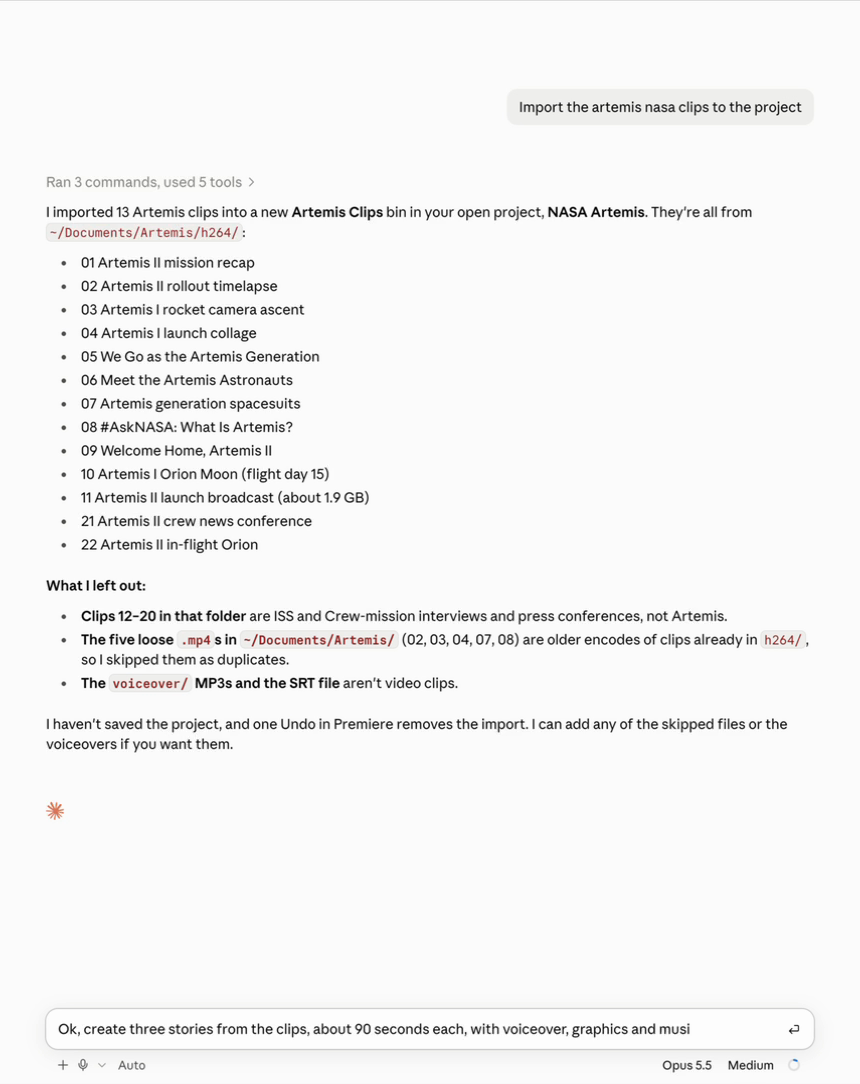
Claude, after the request to import the Artemis clips: thirteen clips imported into a new bin, the files it left out and why, and the next request being typed.
One sentence in, and Claude reports back what it did and what it left out. The next request is already being typed.

Claude can see the footage

It looks at the pictures before it touches the timeline.

EdMon turns any clip into a contact sheet of frames, one per shot for edited material and one a second for rushes, and hands it to Claude. So “use the wide where he walks in” means something. Claude can find the shot, check the frame, and only then cut it in.

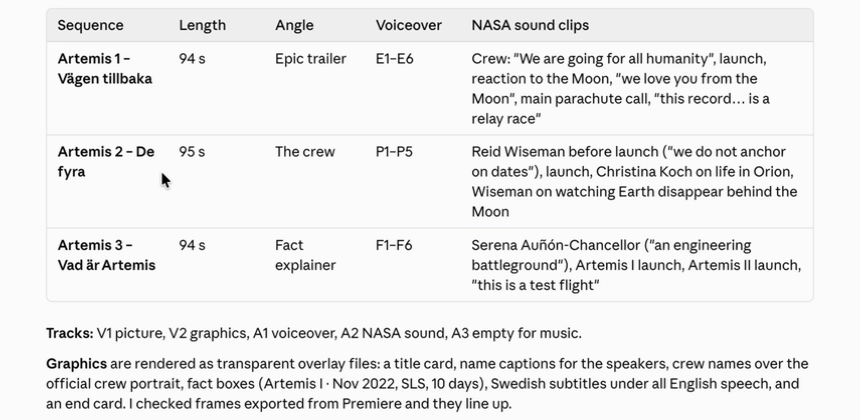
Claude's summary of the three stories it built: length, angle, voiceover and the sound clips it chose for each, and the track layout.
Claude’s own account of the cut: which clips went into each story, and why. Before handing it over, it exported frames from the finished timelines and checked the graphics lined up.

Music, graphics, voice

The parts you used to go and fetch.

The EdMon music library

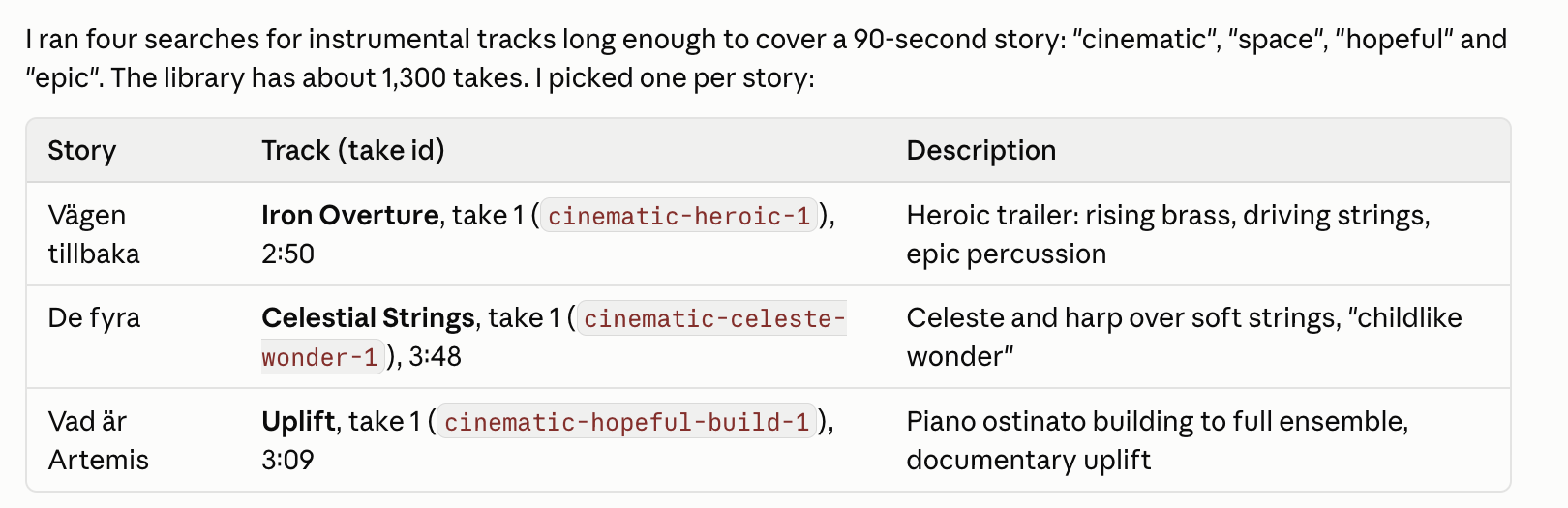
About 1,300 tracks, most in two takes, searchable by title, style and mood. Claude finds one that fits, and it lands in an EdMon Music bin beside your project, ready to drop on the timeline.

Claude's music picks from the EdMon library, one track per story, with the take and a description of each.

Lower thirds and titles

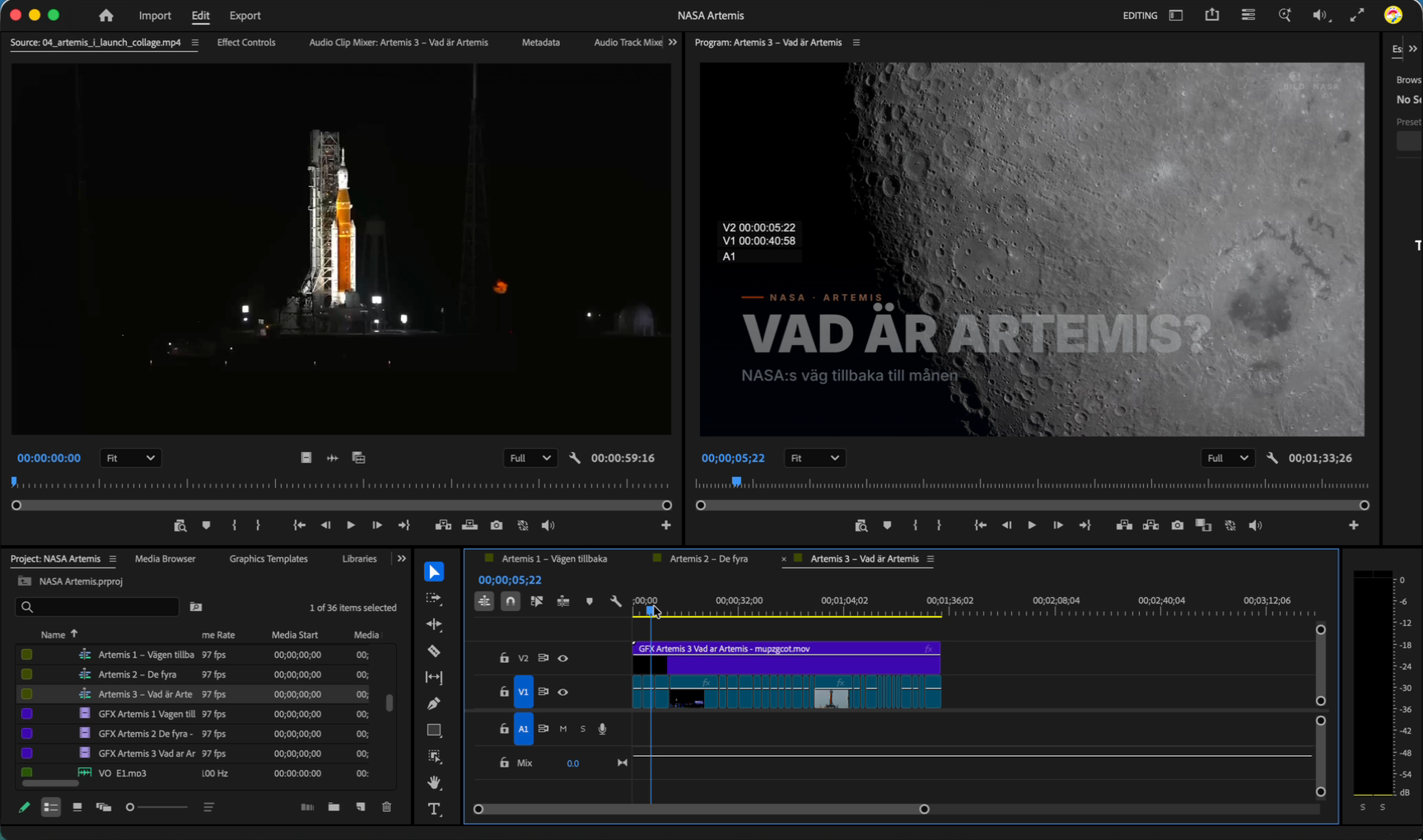
Ask for a lower third, a title card or an animated caption. Claude designs it, EdMon renders it on your Mac as a ProRes 4444 file with alpha, and it arrives in a Graphics bin, ready to lay over the picture.

A title card, Vad är Artemis?, rendered with a transparent background and laid over moon footage on the timeline.

Voiceover and more

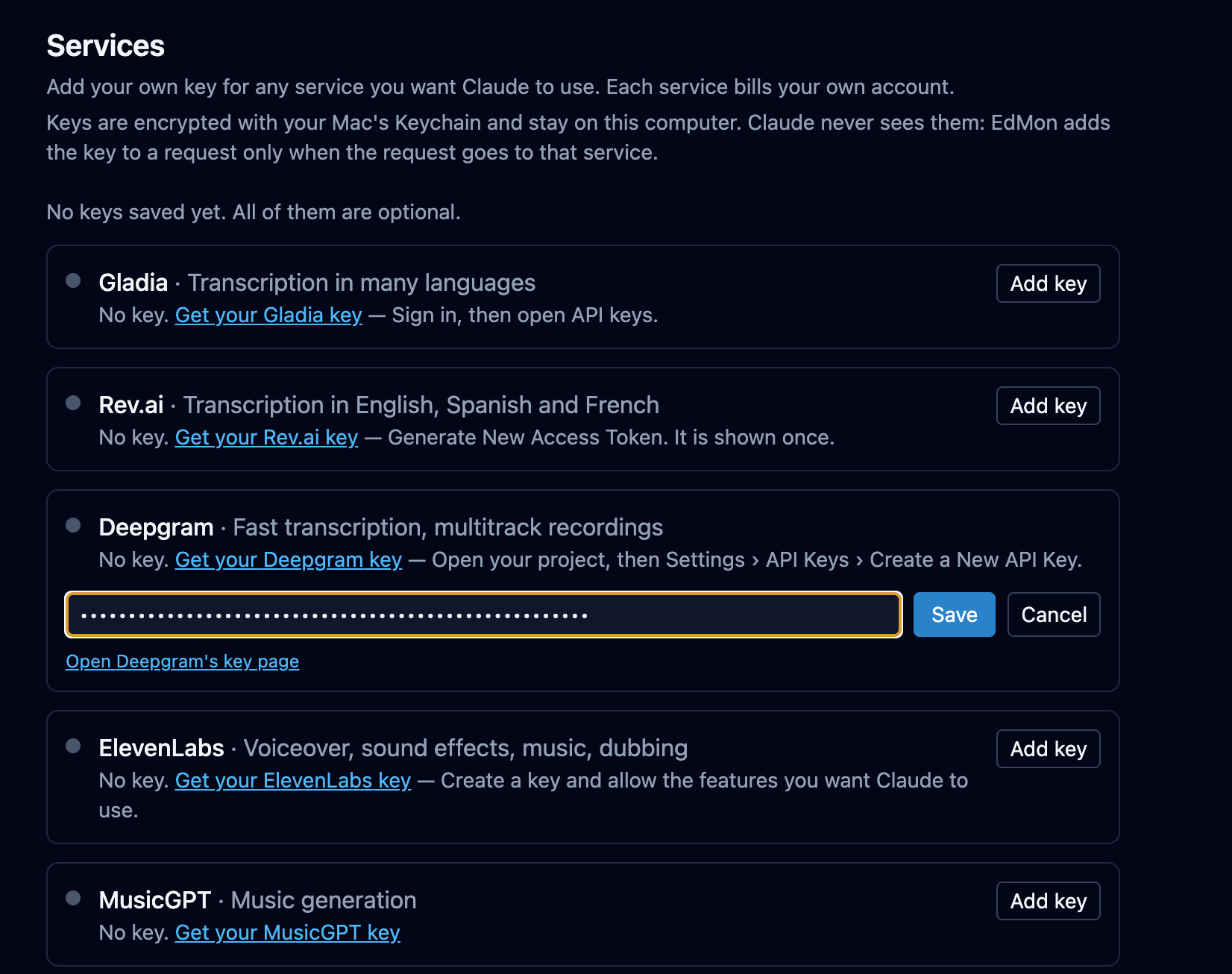
Connect your own accounts with ElevenLabs, Gemini and other services, and Claude can use them in the edit: a guide voiceover for the rough cut, generated images, more transcription when the included hours are used.

The EdMon app's Services screen: a card for each service, Gladia, Rev.ai, Deepgram, ElevenLabs and MusicGPT, with a link to get a key and an Add key button.

It follows you to every project.

EdMon lives on your Mac next to Premiere, not in a browser tab you have to remember. Open any project, open Claude, and your tools, your music library and your connected services are already there.

Who it is for

Editors, assistant editors and edit producers.

Anyone who spends the first half of the day getting a project ready to cut. Unscripted, documentary, branded, YouTube. If you have ever wished you could just tell Premiere what you want, this is that.

Price

Seven days free, then thirty dollars a month.

Every month includes the full EdMon music library and ten hours of transcription. Past ten hours, transcription carries on through your own transcription account, so a heavy month never turns into a surprise invoice from us.

Trial7 days free
Subscription$30 a month
IncludedThe EdMon music library, and 10 hours of transcription every month
Past 10 hoursYour own transcription account, connected in the EdMon app
Other servicesVoiceover, image and video generation through your own accounts with ElevenLabs, Gemini and others
CancellingAny time, from inside your account
You needA Mac with Apple silicon, Premiere Pro, and a Claude plan for Claude Desktop or Claude Code

Start the trial

Download the installer, connect Claude, and ask for your first edit. The trial starts when you make your account in the app.

$30 / month after the trial

  • 7 days free to try it on a real project
  • The EdMon music library, about 1,300 tracks
  • 10 hours of transcription every month
  • Cancel any time, from your account
Start your 7 days free

Describe the edit. Keep the cut.

Start your 7 days free

7 days free. Then $30 a month, with the music library and 10 hours of transcription included.