Coming soon

B-Roll is not in the panel you can download today. This is what it will do when it lands.

EdMon B-Roll · a feature of EdMon Creative Lab

No pictures for that line? Make some.

Every cut has a line the rushes do not cover. B-Roll takes a frame from your own sequence, generates a moving shot from it, and shows you the result before anything touches your timeline.

Starts from your own footage
Ten models, or bring your own
Compare takes from different models
Nothing lands until you place it
Your own fal.ai key

Where it starts

From a frame of your own picture.

Not a stock search, and not a prompt typed into an empty box. B-Roll reads a frame out of the sequence you are already cutting and generates motion from it, so what comes back is built on your material rather than resembling it.

Choosing a frame in the sequence and generating a shot from it.

The models

Ten models. Or any other you like.

Different models are good at different things — motion, faces, texture, how much they invent. Ten are built in, from Kling and Seedance to Ray, LTX, FLUX and MiniMax. If the one you want is not there, paste its fal.ai id and it is. Pick five or ten seconds, and a camera move if you want one — push in, orbit, track, locked off.
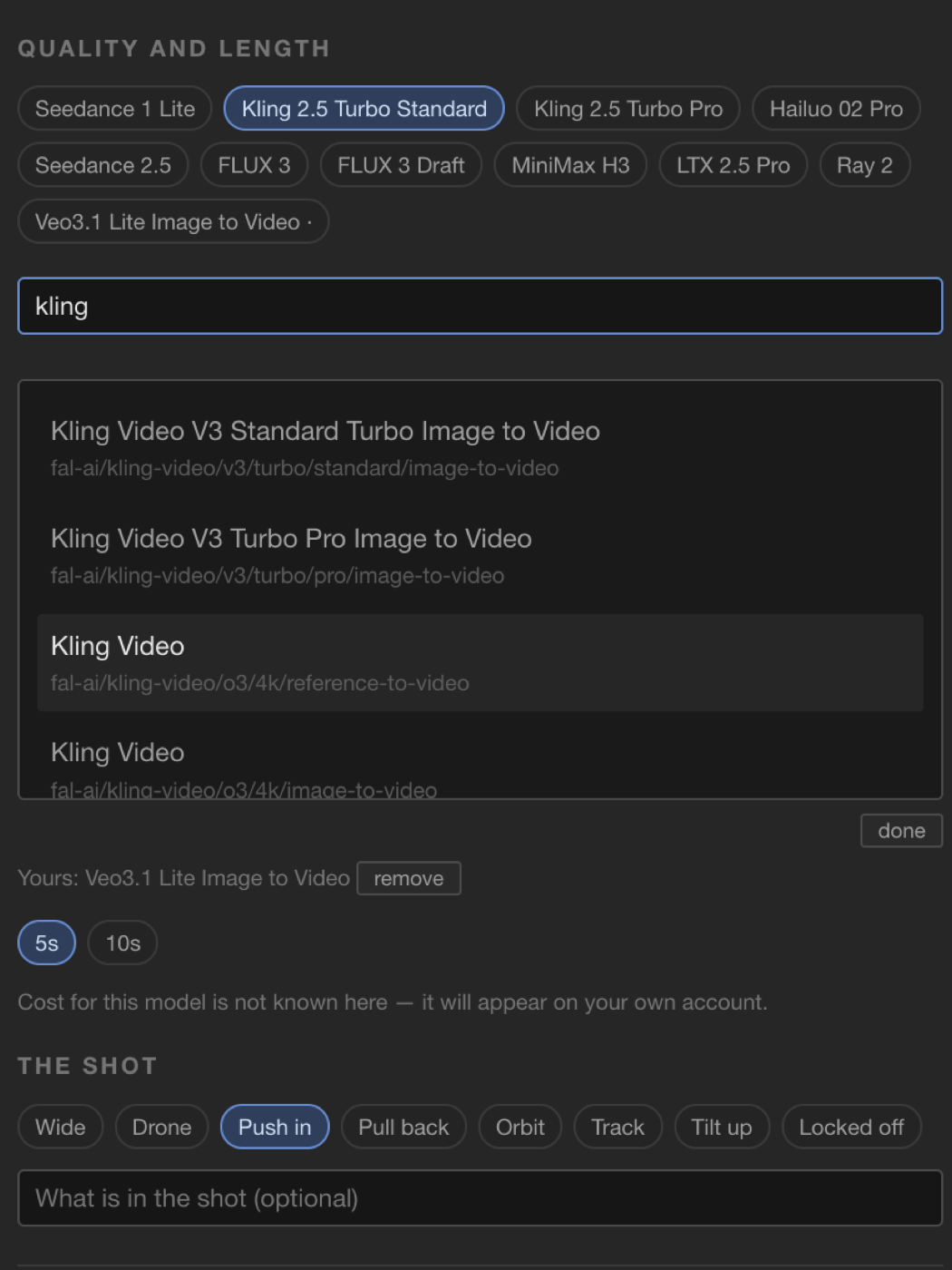
The B-Roll model picker: ten models to choose from, a search field for adding any other by its fal.ai id, a five or ten second length, and a note that the cost of a generation appears on your own account

The same shot from two models — Seedance on the right. We do not show what a generation costs, because we do not know. It runs on your fal.ai account and appears on your bill there, at whatever that model charges.
The library

Run the same shot on three models. Then pick one.

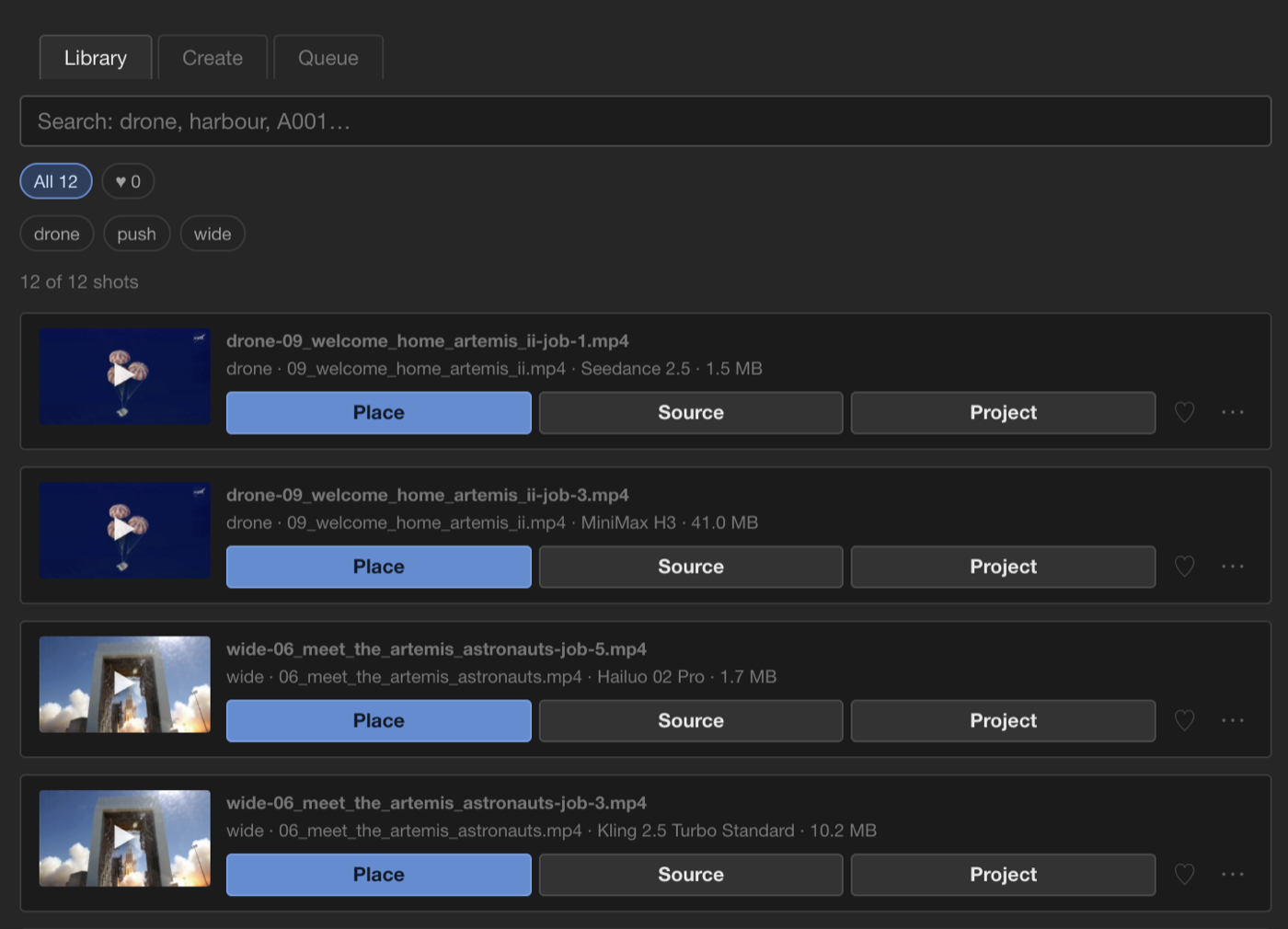
There is no way to know in advance which model will get a shot right, so B-Roll is built to let you try. Every shot you generate is kept, and each one is labelled with the source clip it came from, the camera move you asked for, and the model that made it — so comparing two takes of the same idea is reading one line, not remembering what you did an hour ago.

Labelled with what made it

Seedance, Kling, Hailuo, MiniMax — the model is on the shot, not in your head. You learn which one suits which kind of picture by looking.

They live beside your project

Shots are written to a Video folder next to your .prproj, not inside the panel. So they survive reinstalling the panel, and they travel with the project to another machine or another editor — the takes you did not use included.

Models differ in what they cost you as well as how they look, and you are the one paying fal.ai for the render. The model name on every shot is how you work out which is worth it for which kind of picture.

The same drone shot from two models — MiniMax H3 on the left, Seedance 2.5 on the right.

The B-Roll library listing twelve generated shots, each labelled with its source clip, camera move and the model that made it

Two takes of the same drone shot, one from Seedance 2.5 and one from MiniMax H3, side by side in the library.

Before it exists

Watch it first. Place it if you want it.

The shot is generated, downloaded and shown to you. Nothing reaches your sequence until you press Place. A shot you do not want leaves nothing to tidy up — no stray clip, no orphaned file, no undo to remember.

Nothing lands unseen

You see the finished shot before your timeline does. That is the whole point of the review step, and it is why this is usable on a real job.

Placed where you are parked

When you do place it, it arrives on its own track at the playhead, like any other clip you would have cut in yourself.

Your account, your key

You generate on your own account.

B-Roll runs on your fal.ai key, not ours. Your frame goes straight from your machine to the provider you picked, and you pay them for what you generate.

You will need a fal.ai account and API key

Without one, B-Roll cannot generate a single shot. The generation cost is separate from the subscription and is paid to fal.ai directly.

What you get for it: nothing sits between you and your material. We do not license what you generate, because it is not ours to license — it comes from the model provider you chose, on their terms. We keep a copy of each finished shot in your account so it survives their download link expiring.

When it lands

$10 a month, on top of whatever else you use.

B-Roll is a feature of the EdMon Creative Lab panel and is subscribed to on its own. A Music subscription is separate; neither includes the other. Thirty days free when it launches, no card.

Download EdMon Creative Lab B-Roll terms

Downloading now gets you the panel with Music in it. B-Roll arrives in a coming release, and the panel will tell you when it does.