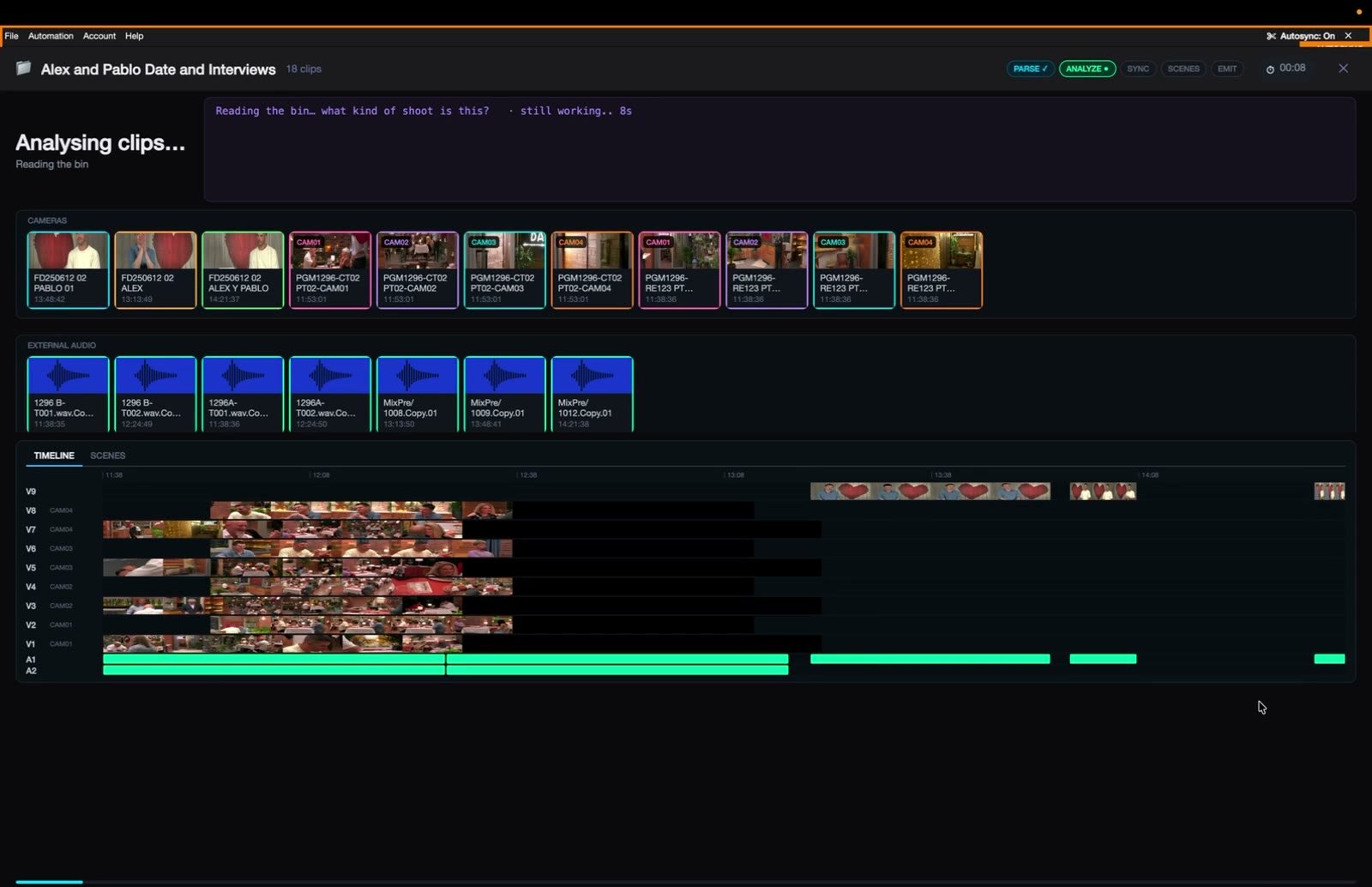
EdMon Media Manager
Advanced Media Composer parsing, processing and round-tripping, built on real productions.
Confidential
Advanced Media Composer parsing, processing and round-tripping, built on real productions.
Confidential
The vision
MONDAY · DAY
Footage ingested into Avid. Bins flagged for processing.
MONDAY · OVERNIGHT
Parse, sync, audio matching, scene split, rough cut. Nobody in the loop.
TUESDAY · 09:00
Producers watch cuts in the browser; editors open them in Media Composer.
Real productions
18 clips
from one First Dates day: 8 cameras on 2 rigs, 3 interviews, 7 audio recorders.
2–3 days
of assistant-editor prep per shoot day: syncing, grouping, splitting, naming.
1 timeline
is where editors on larger shows actually work: a dailies sequence holding all of it.
Sources: First Dates case study (Aug 2026) · EdMon partner deck (Jul 2026)
What Media Manager does
01 · PARSE
Sequences, multicam and group clips, sync clips and timecode, straight from the .avb file.
02 · PROCESS
Autosync, audio-to-camera matching, scene split and rough cuts on multicam days of any size.
03 · ROUND-TRIP
Native bins and AAF that open in Media Composer, and a web app where producers review and tweak cuts.
EdMon Media Manager · Confidential
Media Manager in one minute
Media Manager reads the dailies bin, syncs every camera to every recorder, splits the day into scenes and builds rough cuts. Then it round-trips them into Media Composer and publishes them to the web.
Avid
Premiere
Resolve
Web
EdMon Media Manager · Confidential
The pipeline
01
Sequences, group and sync clips, straight from the bin.
02
Vision model labels each clip: studio, reality, interview, b-roll.
03
Every audio track on its own; silent tracks dropped first.
04
Timecode plus Avid’s own offsets, into multicam groups.
05
Assigns recorder tracks to the right camera clips.
06
Finds story boundaries minute by minute.
07
From the editor’s work or an EdMon template.
08
Into Media Composer, and onto the web for producers.
EdMon Media Manager · Confidential
Architecture · under the hood
DESKTOP APP
One .NET 8 and Avalonia 11 code base for macOS (arm64 and x64) and Windows, plus a headless CLI
MEDIA ENGINES
C++ Avid bin reader, FFmpeg, MLT and LibVLC playback, bit-exact DNxHD decode
SIDECARS
Python: pyavb and pyaaf2 bin writers, timecode probes, sync toolkit
AI LAYER
Claude, Gemini and OpenAI behind one routing client; Rev.ai, Deepgram, Gladia, Google speech
CLOUD
Firebase auth, database and storage; Cloud Run bin parser, speech proxy and rough-cut-to-bin
142k
lines of C#
24k
lines in our C++ bin reader
1,217
test methods
1,291
commits on the cross-platform app since May
EdMon Media Manager · Confidential
Parsing
Sequences
Multicam and group clips
Sync clips
The sync maps EdMon generates itself
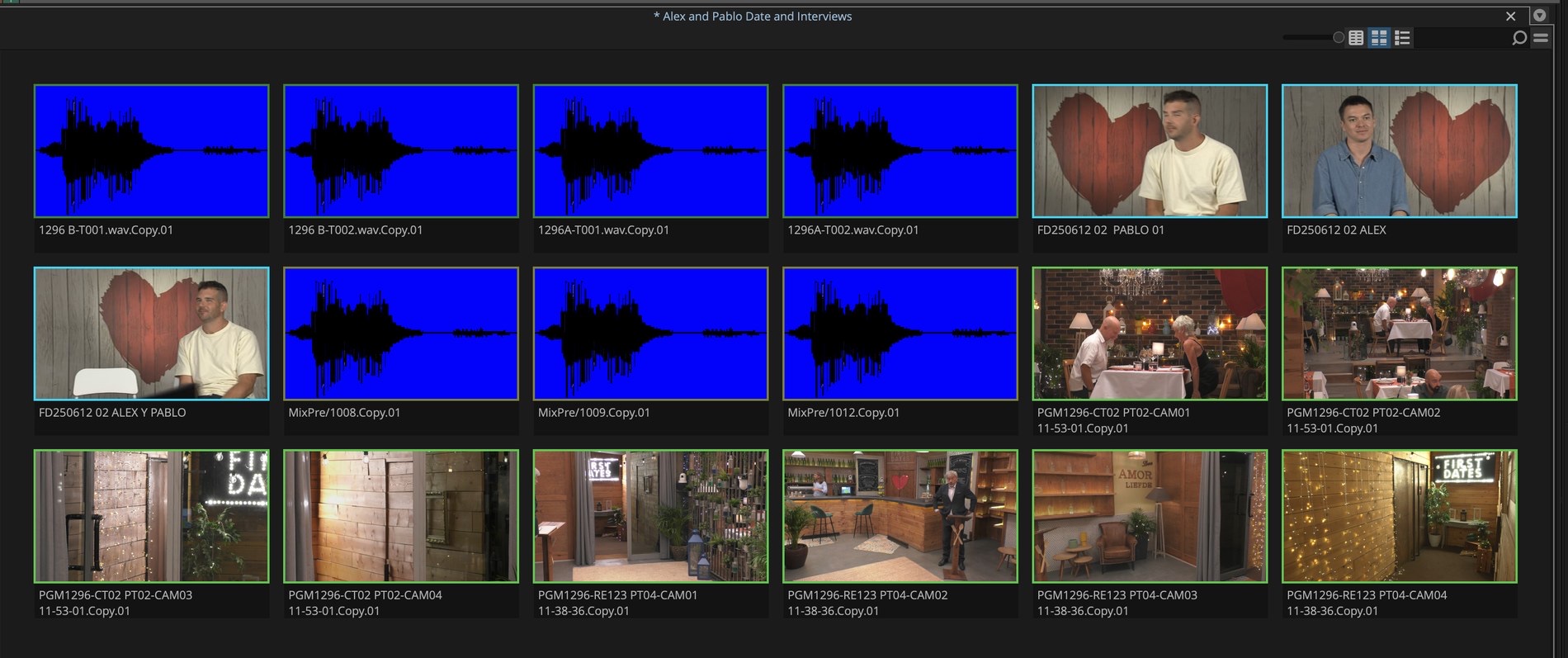
A real First Dates bin, read natively: no Avid SDK and no Media Composer install on the processing machine.
EdMon Media Manager · Confidential
Parsing · under the hood
01
Our own cross-platform C++ reader (macOS, Windows, Linux) opens the .avb in a child process.
02
Every mob comes back as JSON: tracks, edit rate, start timecode, markers, group cameras and angle segments.
03
Media is linked through Avid’s msmFMID.pmr databases to the OP-Atom MXF files on disk.
04
A .NET layer repairs flattened multicam cuts, resolves angles and caches results by content hash.
05
The same reader runs in the cloud as a Cloud Run service.
| Clip type | Stored as |
|---|---|
| Master clip | Master mob |
| Sequence | Composition, usage 0 |
| Sync clip | Composition, usage 2 |
| Multicam group | Composition, usage 4 |
703 bins, 0 failures
Media Composer 18.12 to 25.6
EdMon Media Manager · Confidential
Timecode · under the hood
WHERE TIMECODE COMES FROM
Avid bins
Walks master-to-source mob chains to the timecode component: start frame, rate, drop flag
MXF and QuickTime
Embedded timecode tracks, read with ffprobe
Broadcast WAV
Sample-accurate time_reference converted to timecode
THROUGH THE EDIT
Exact rates
Kept as rationals (24000/1001, 30000/1001) with drop-frame flags
Cut to source
Any point on a sequence or multicam cut resolves to its source clip and source timecode
No guessing
If timecode can’t be resolved exactly, none is shown
EdMon Media Manager · Confidential
Multicam and sync clips · under the hood
READING
Avid’s stored frame offsets are the truth; timecode only verifies. Camera clocks can be a minute apart.
Each camera’s offset = its leading filler minus its media in-point.
Angles are identified by their slot in the group, never by name or path.
Flattened cuts are repaired: lost leading audio filler, dropped repeat angles, under-read offsets.
WRITING A MULTICAM GROUP
Group clip · usage 4, a selector gangs the angles
Composition · usage 5
V · one offset-aligned track per camera
A · one track per camera × recorder channel
Sync clip (usage 2): one camera plus its recorder package, up to 8 channels per recorder.
EdMon Media Manager · Confidential
Sequences and dailies
On larger shows the day lives on one dailies sequence. Media Manager can:
Play any sequence frame-accurately
Trace every cut to its source clip
Honour solo and mute to isolate audio
EdMon Media Manager · Confidential
Automation
01
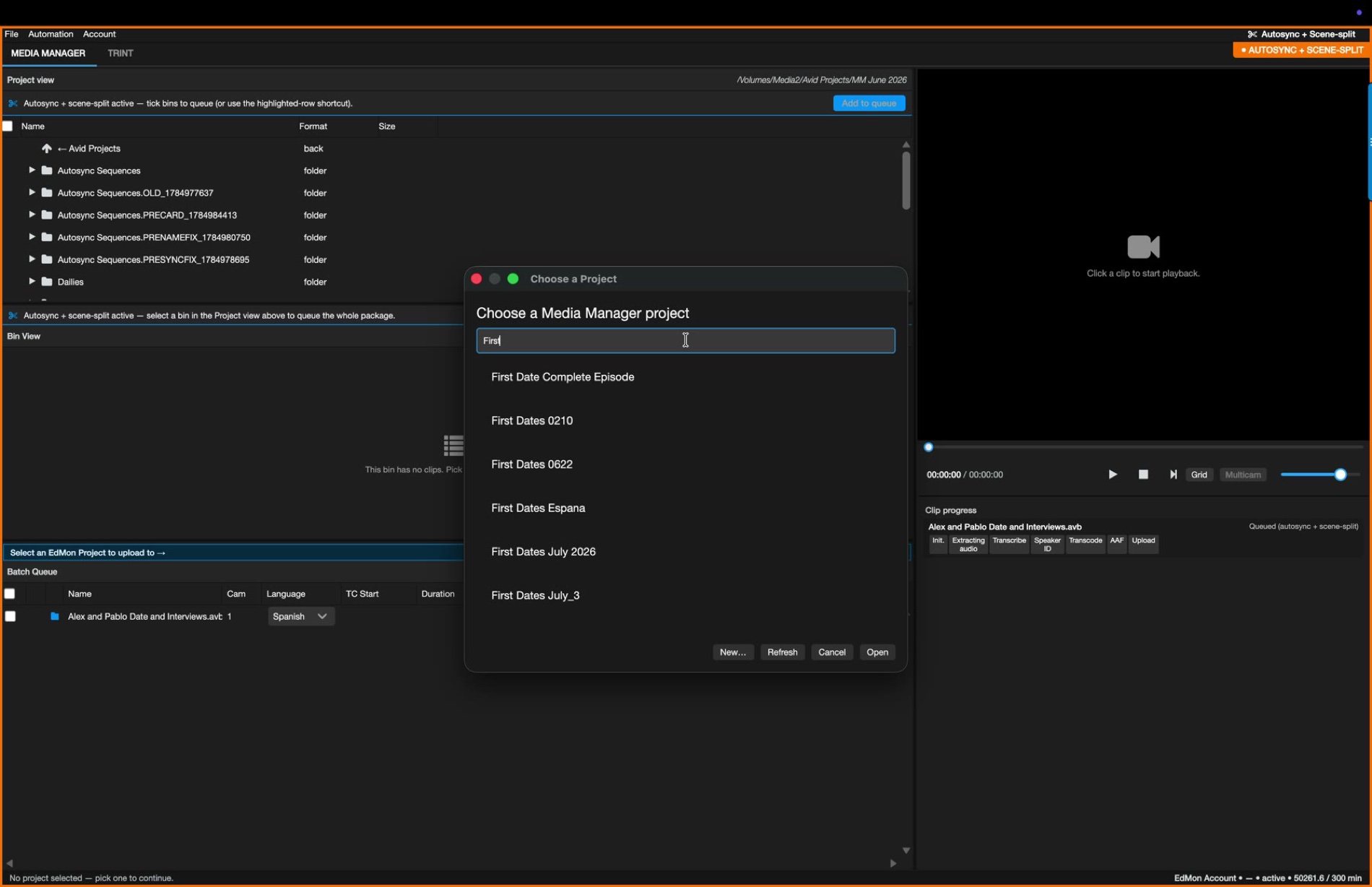
The editor adds _process to a bin name in Avid.
02
A watch folder picks it up and queues the whole package.
03
Batch queue runs up to 35 transcription jobs at once.
04
A report email goes out for every finished or failed bin.
EdMon Media Manager · Confidential
Automation · under the hood
01
File-system watchers (FSEvents on macOS) follow *.avb recursively in every watch folder.
02
A settle check waits until Avid has finished writing the bin.
03
A _process or _reprocess suffix, or a colour tag, triggers the bin once.
04
The whole bin is queued as one package; a failed run fails visibly, never silently.
05
Transcription fans out per service, with 35 jobs in flight at peak.
06
A day report goes to the team; failures alert the operators.
EVERY STAGE IS A MODULE
id · version
typed input / output ports
cost class: free · llm · api
settings as JSON Schema
provenance of every value
Every model call is recorded: prompt, images and reply.
About 50 CLI flags for headless runs.
EdMon Media Manager · Confidential
Autosync
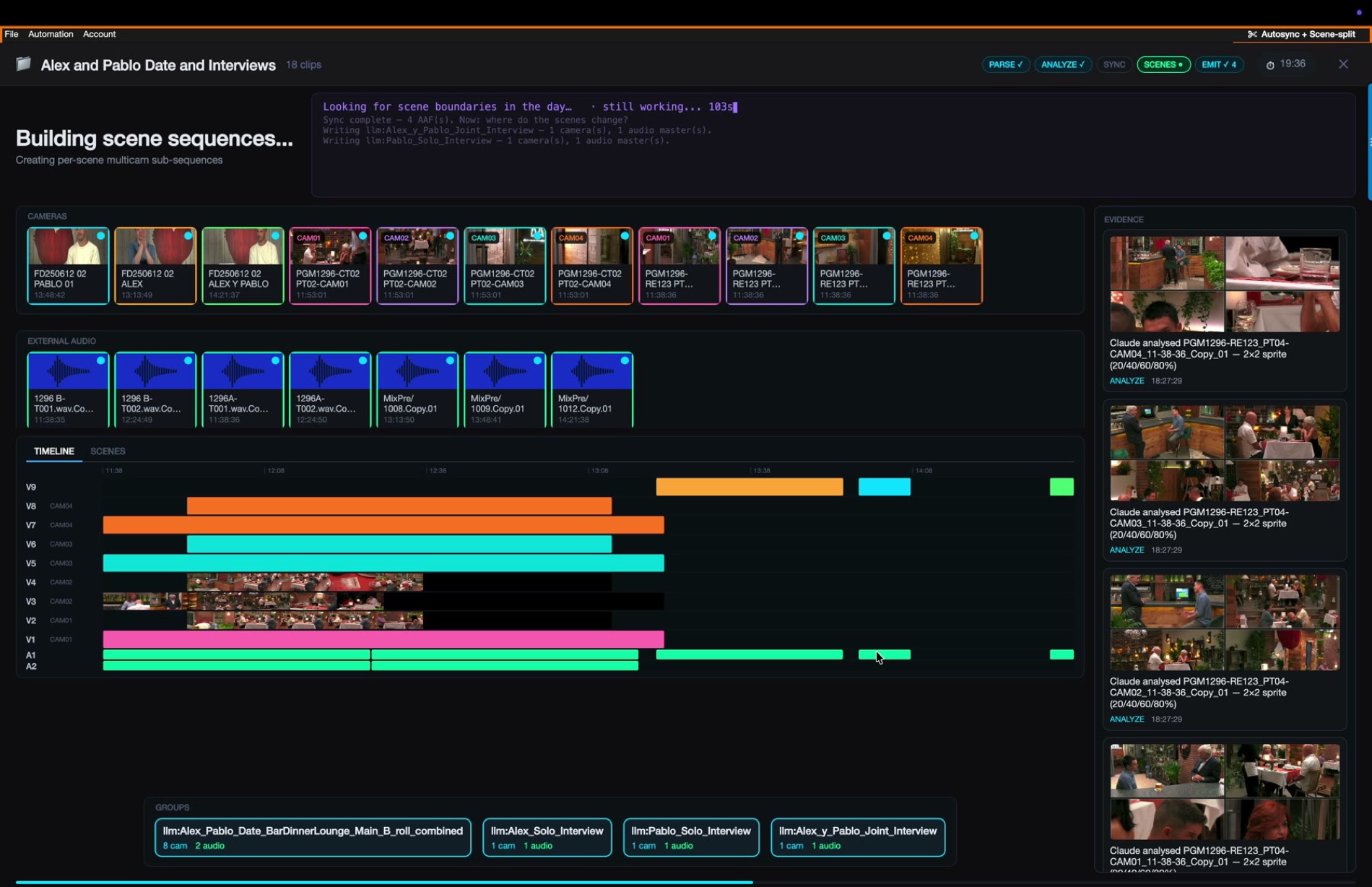
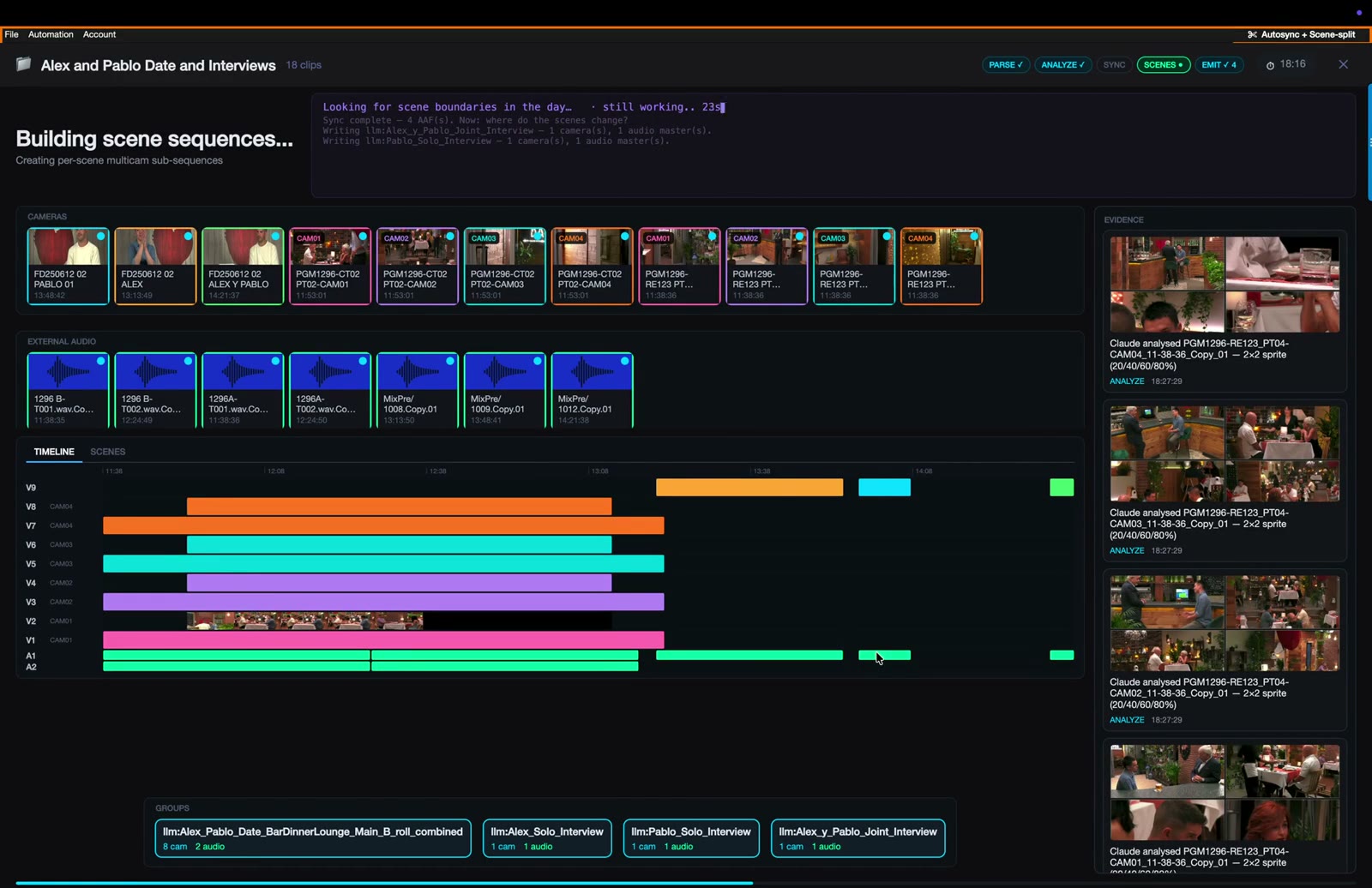
Autosync turns a bin of unsynced camera clips and sound-recorder files into multicam groups, ready to cut.
Synced from timecode and Avid’s offsets
Grouped by what was said and seen
Written as native group clips
EdMon Media Manager · Confidential
Autosync · under the hood
01
Parse the bin: every camera and recorder file, with start timecode and track layout.
02
Group by content: transcript summaries and camera stills decide what belongs together.
03
Place every take at its real timecode on a full-day sync map.
04
Trim to the window where the main cameras roll.
05
Write multicam group clips, or sync clips for a single camera, straight into the bin.
RULES
Avid’s own offsets always win over computed ones.
Content decides grouping, not timecode overlap alone.
Recorder channels are soloed, never dropped.
Sync toolkit for material without usable timecode: LTC decoding and FFT waveform matching.
EdMon Media Manager · Confidential
Autosync · accuracy
0.00 s
worst camera-to-audio difference across 20 samples in 5 sequences
± 1 frame
tolerance, checked against burnt-in timecode
EdMon Media Manager · Confidential
Audio to camera
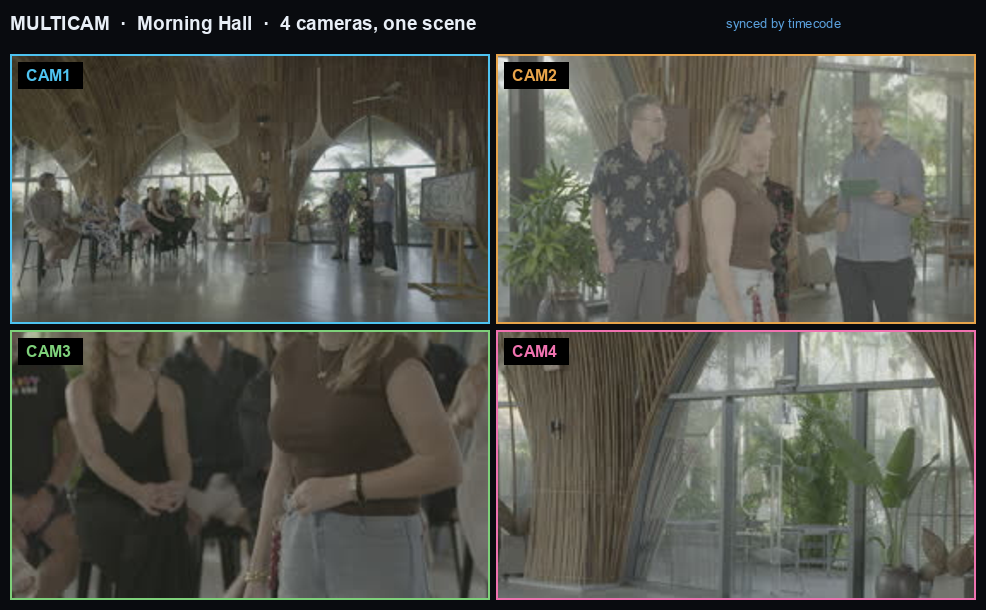
EdMon works out which recorder tracks belong to which camera clip or clips, from what is said and what is seen, not timecode alone. Another manual step removed.
31 of 88
silent tracks dropped in one test, before any AI spend
EdMon Media Manager · Confidential
Scene split
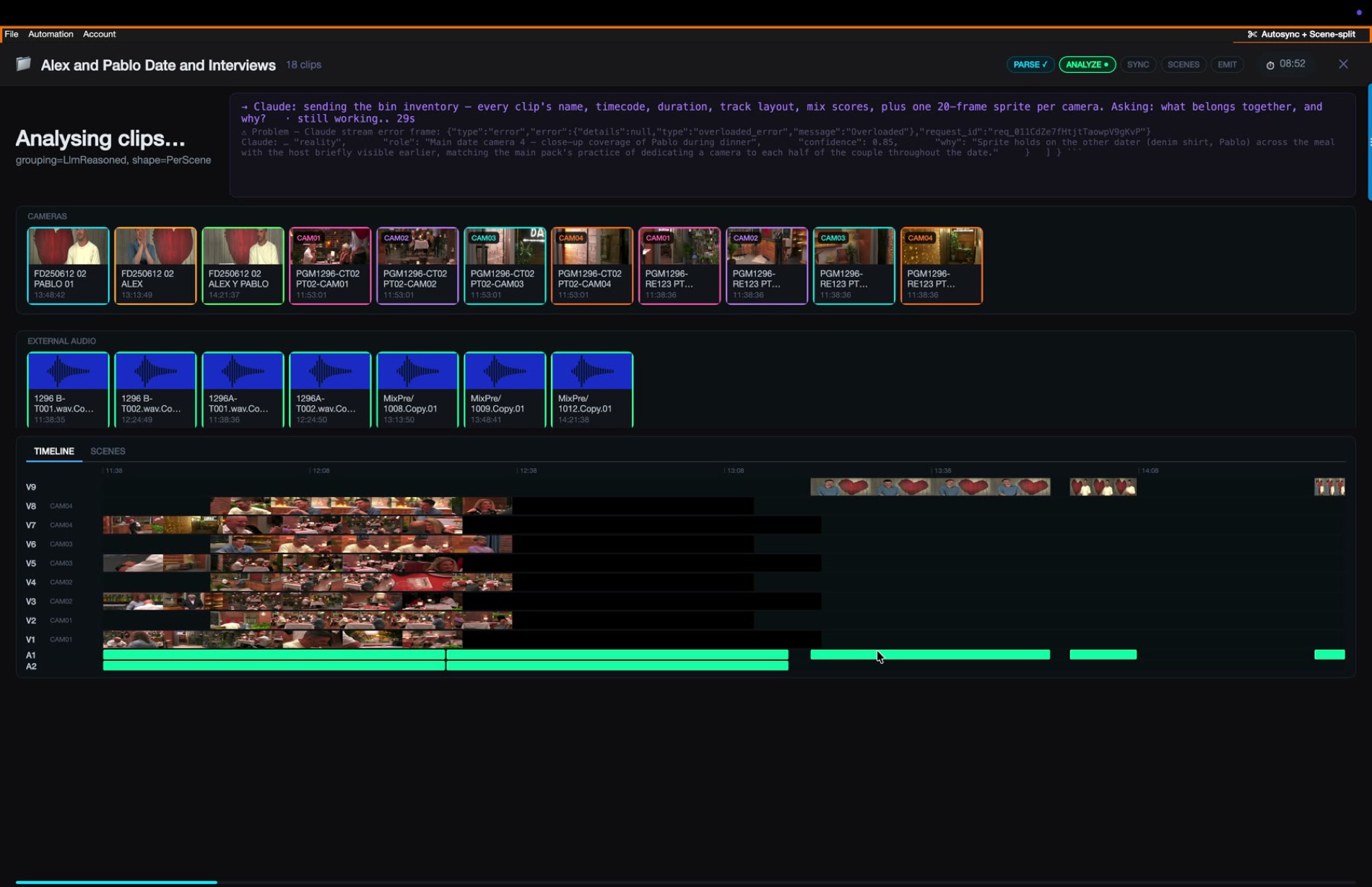
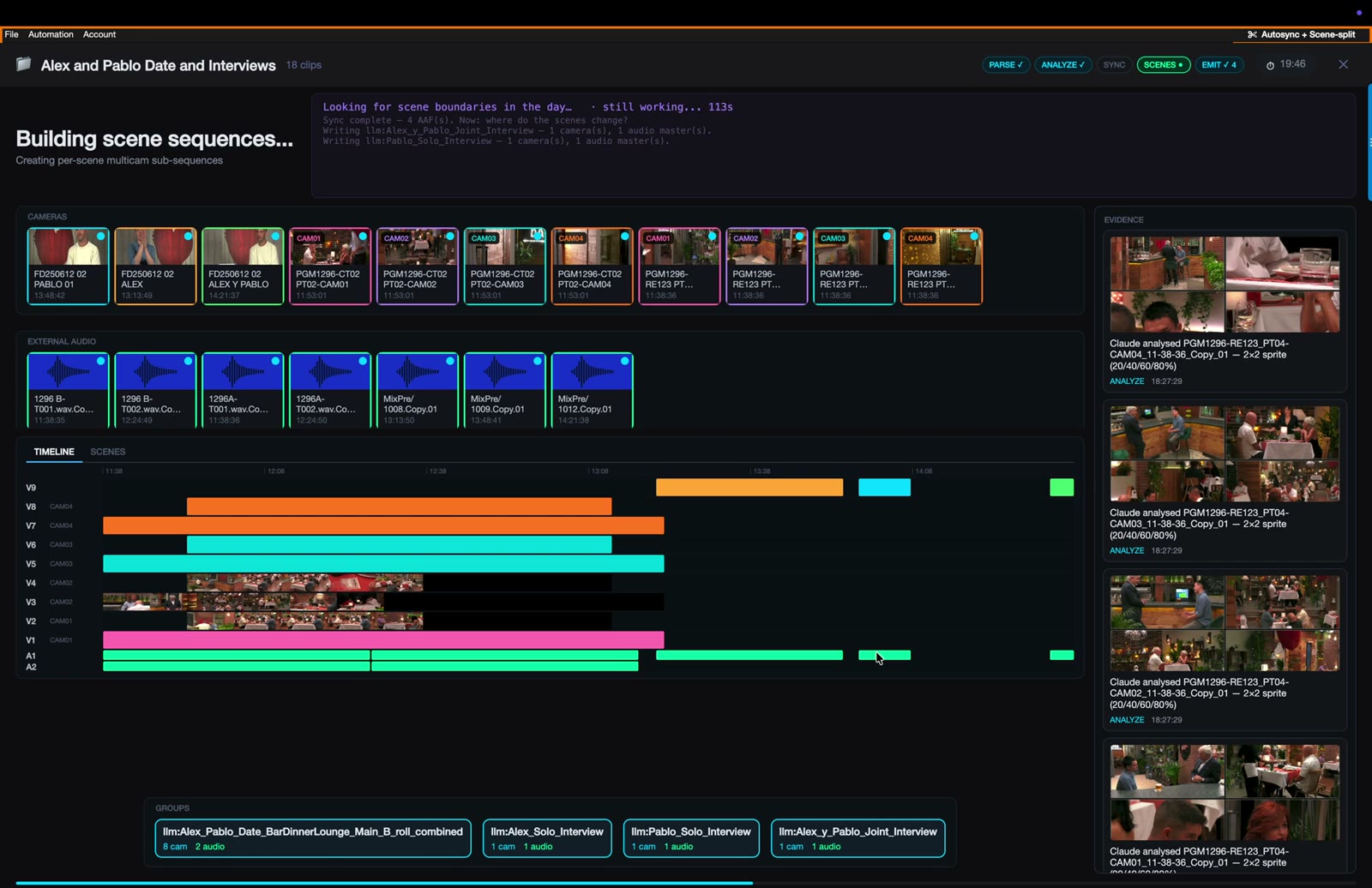
For every camera group, the model reads a 2×2 grid of angles each minute, plus the transcript, and marks where the story moves.
Show formats ship as templates, with their own location names.
EdMon Media Manager · Confidential
Scene split · under the hood
| Node | Stage | What it does |
|---|---|---|
| 01 | Bin source | Parses the bin into a clip set; nested group, sync and sequence mobs set aside |
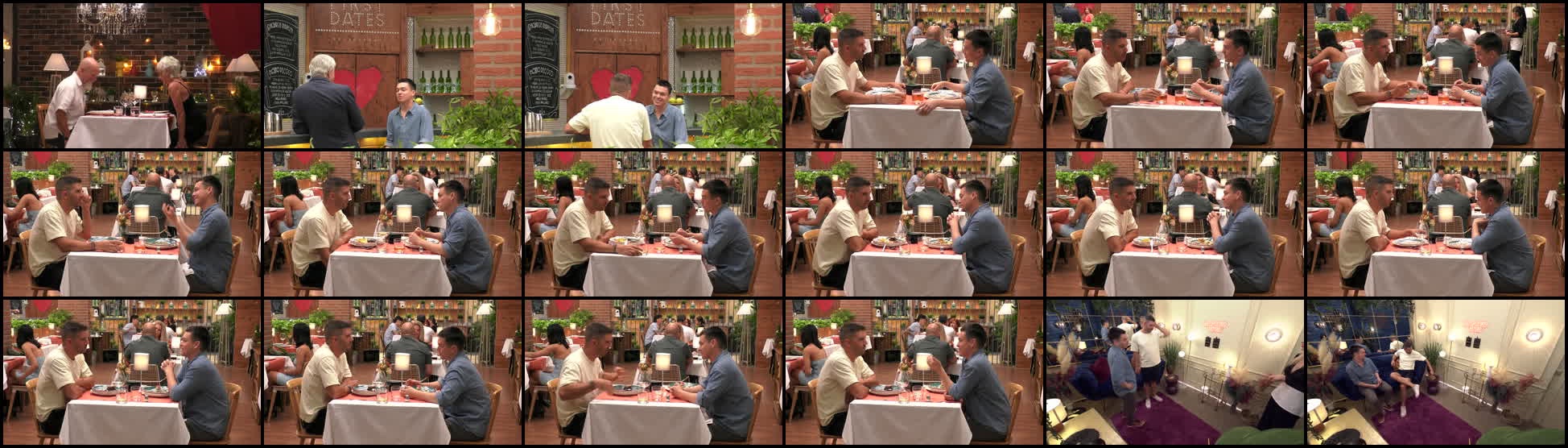
| 02 | Content type | 20-frame contact sheet per clip: studio, reality, interview or b-roll |
| 03 | Silence gate | Drops tracks under −50 dB in three sample windows, before any spend |
| 04 | Transcriber | Every audio track separately; Rev.ai, Deepgram, Gladia or Google; cached |
| 05 | Grouping | Minute summaries plus stills: which audio goes with which cameras; picks main cameras |
| — | Timeline | Sync map at real timecode, trimmed to the main cameras’ window |
| 06 | Scene split | A 2×2 camera grid per minute plus transcript, one model call per group |
| — | Normalise | Labels bound to the format’s vocabulary; scenes under 3 minutes merged |
Every prompt, image and reply is recorded per node · a harness diffs each node against validated results
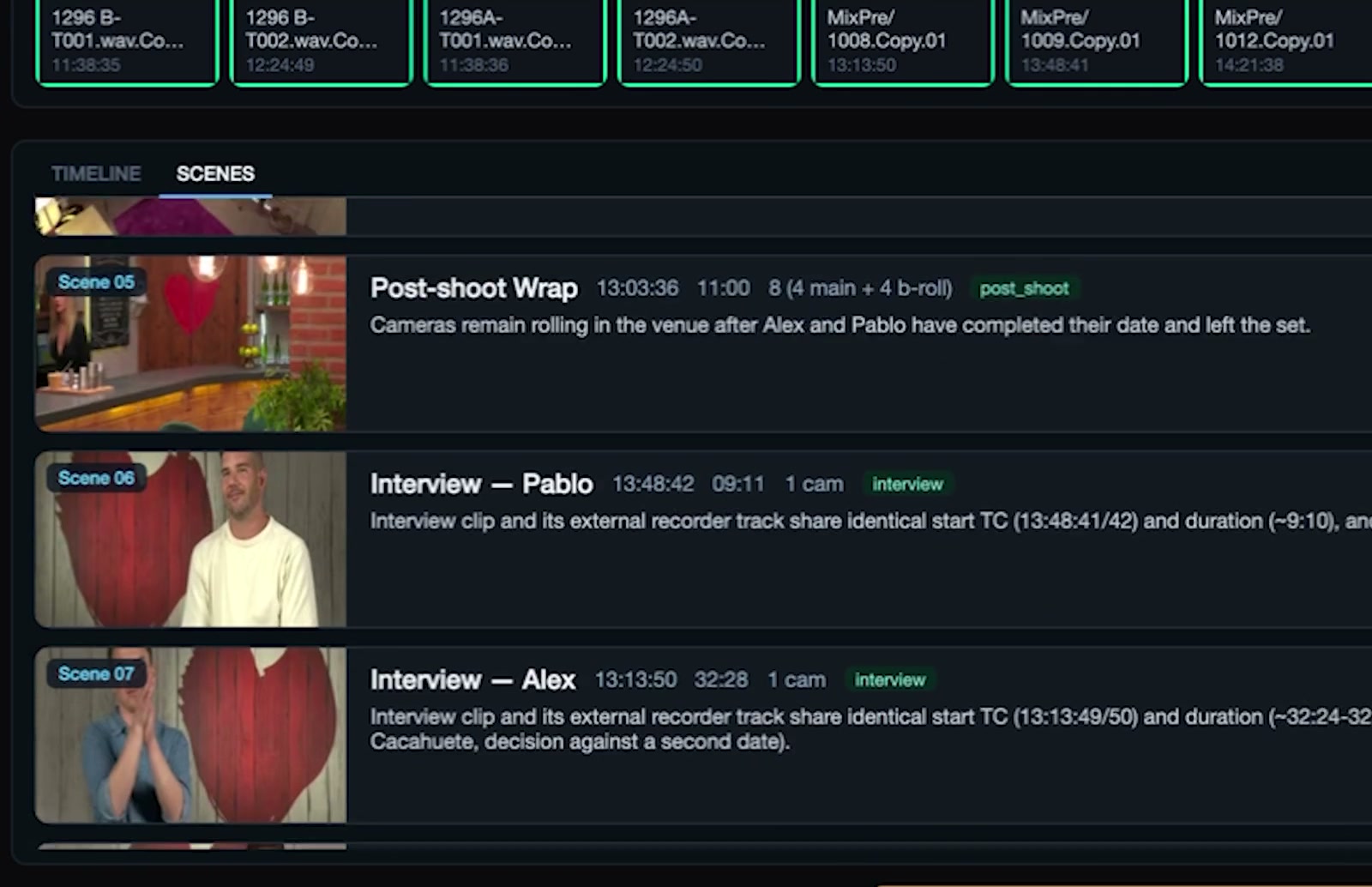
Scene split · output
Every scene arrives with a title, start timecode, duration, camera count, a type tag and a description written from what was seen and said.
EdMon Media Manager · Confidential
Rough cut
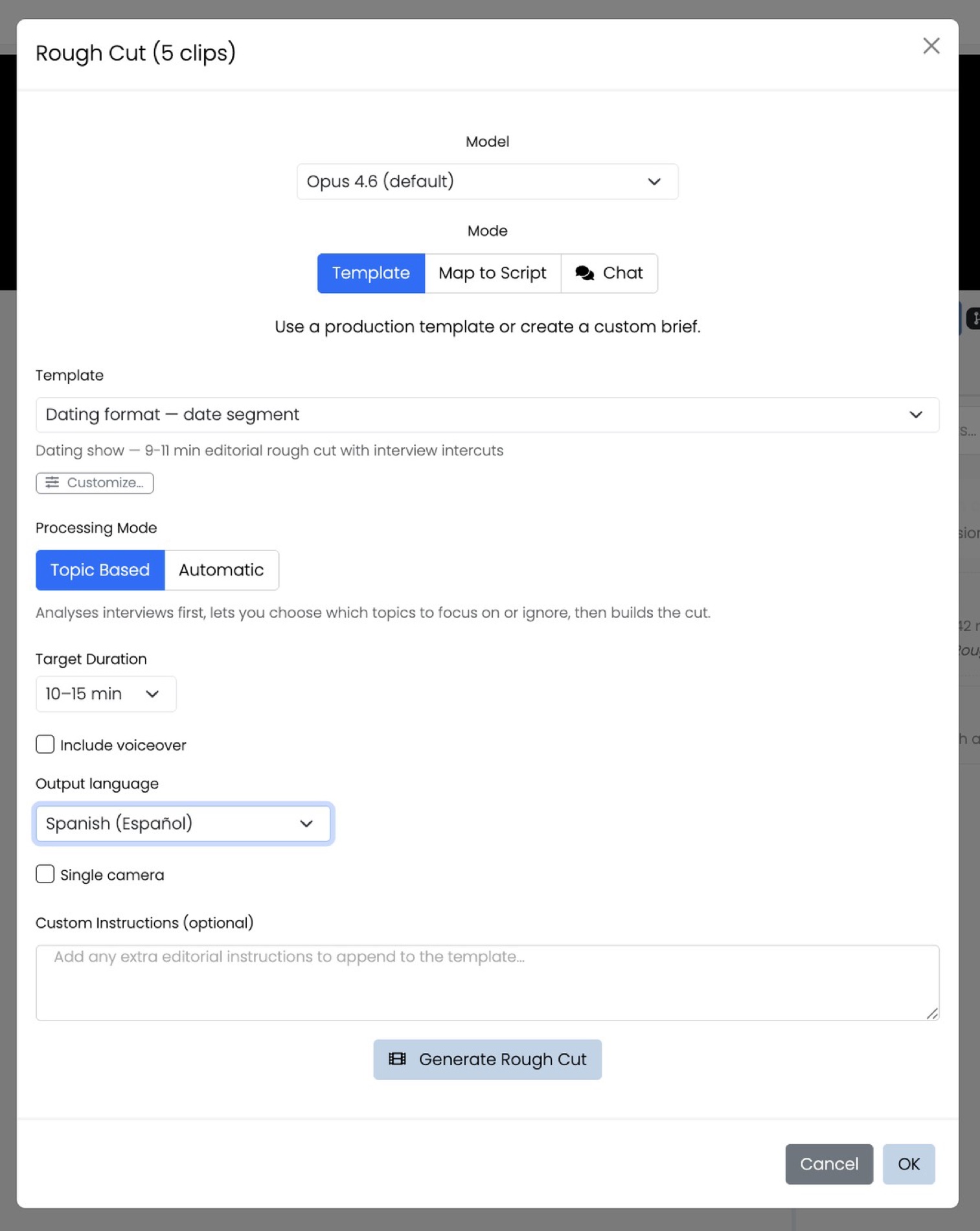
Two starting points:
The editor’s own work
Selects, scenes and structure already in the project
EdMon rough-cut templates
Per format, e.g. a 9–11 min date segment with interview intercuts
EdMon Media Manager · Confidential
Round-trip
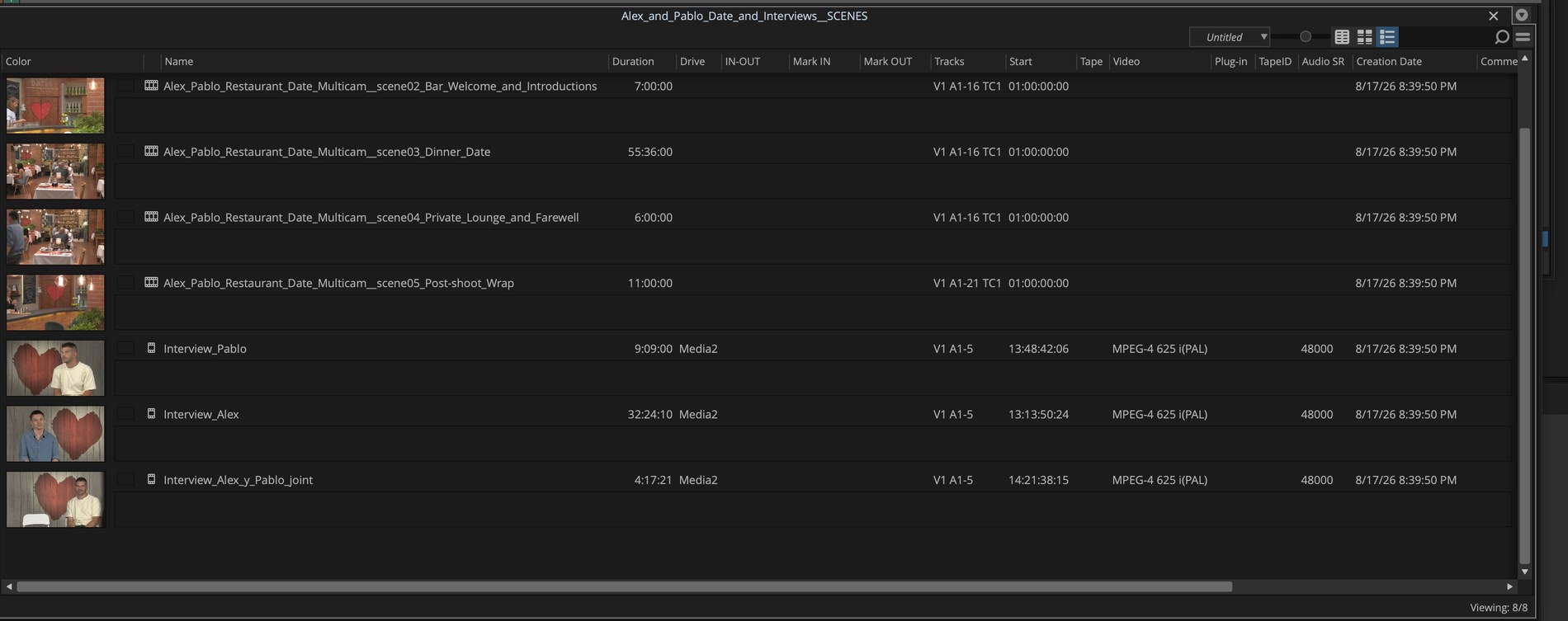
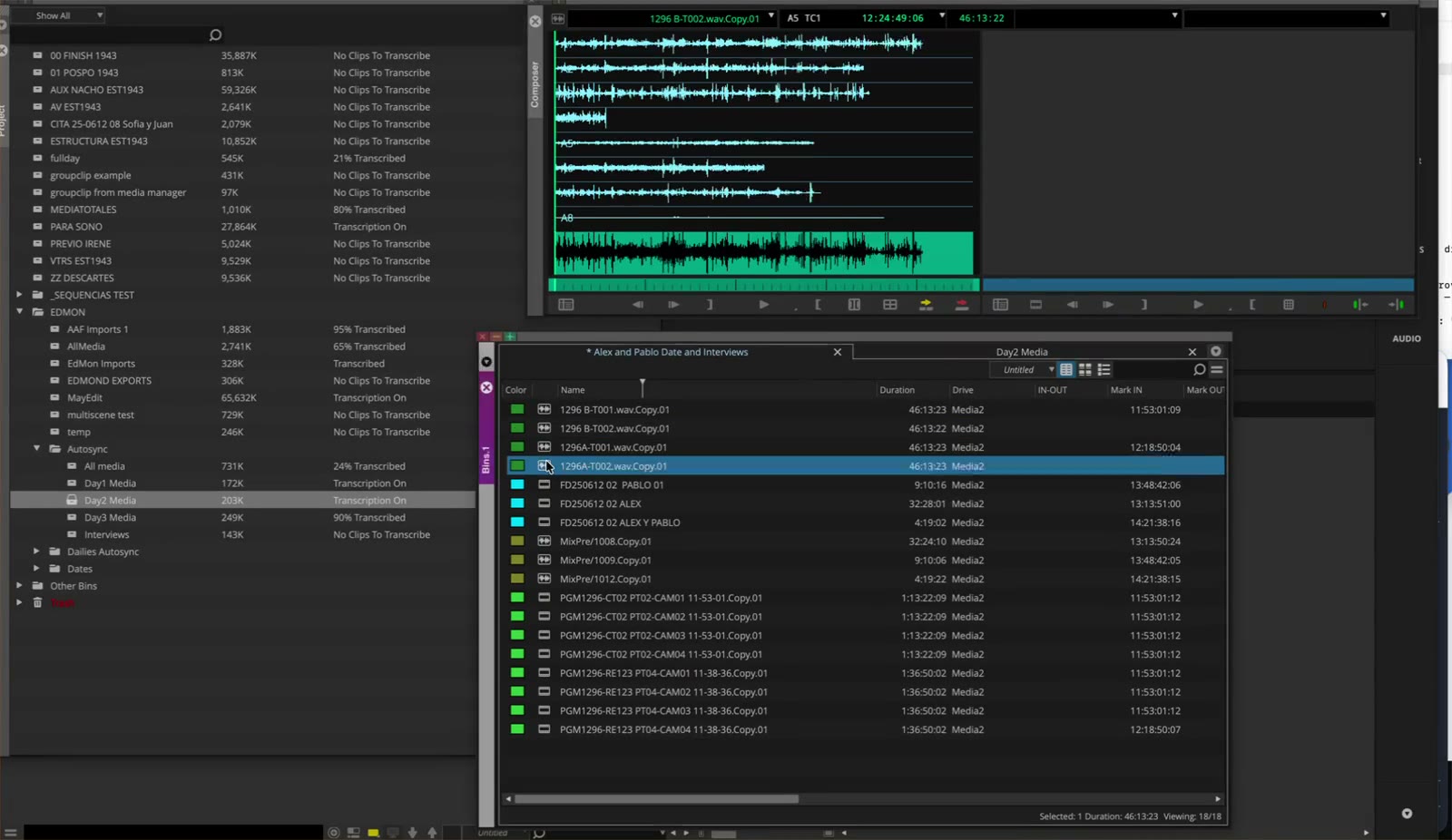
Native .avb bins or AAF land in the editor’s own project, ready to open. No Avid SDK, no Media Composer install on the processing machine.
Works with Media Composer 18.12 to 25.6.
EdMon Media Manager · Confidential
Round-trip · under the hood
01
Works on a copy of the editor’s bin: new compositions are added, master clips stay untouched.
02
Timecode and edgecode tracks come from a template authored in Media Composer.
03
Scenes land in a child __SCENES bin next to the editor’s own.
04
Captions reuse an Avid SubCap effect: 42 characters × 2 lines, 2-frame gaps.
05
Rough cuts made on the web come back as an .avb through a cloud service.
OUTPUTS
Media Composer
Native .avb, or AAF
Premiere Pro
FCP7 XML
DaVinci Resolve
.drt timeline, relinks by path
Trint
Story to .avb sequence
EdMon Media Manager · Confidential
Web producer workflow
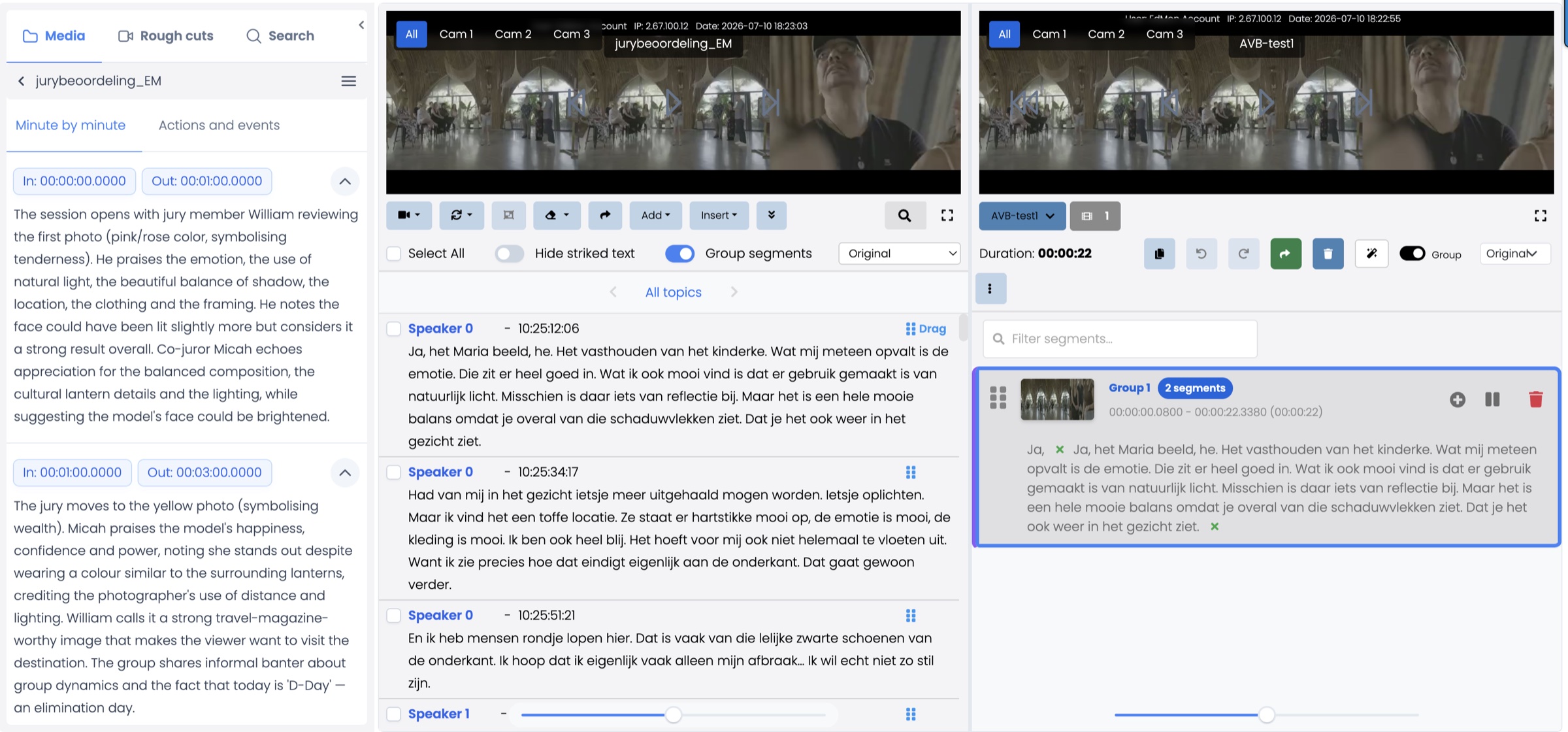
Review rough cuts in the browser
Tweak, trim and reorder segments
Summaries, transcripts and search
EdMon Media Manager · Confidential